Invoice for iPhone and iPad

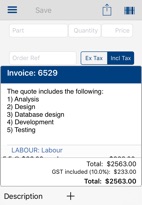
Invoice is an app that enables small Australian and New Zealand businesses with a valid ABN or IRD/GST number that currently create invoices with pen and paper and calculator to digitally create and print, email or SMS Tax Invoices and Quotes.
Invoice speeds up invoice creation, reduces errors, improves productivity in the invoice creation process and therefore reduces the next customer's waiting time.
By entering item codes or scanning barcodes and allowing the iDevice to perform all the calculations, errors and subsequent re-keying are reduced and the whole sale-finalisation process is faster. The customer receives a legible Quote or Tax Invoice where the numbers add up.
Items can be stored internally with their part codes, descriptions, barcodes and prices (ex-GST, including GST or GST-free). The item unit type eg kilo, meter, hour, day, bag etc can also be specified.
The item barcodes can be scanned with an iPhone, iPod or iPad with a camera, the quantity entered and the item added to the invoice. Items can also be added to the invoice by entering the item code. When entering an item code, a pop-up list of the first 40 codes matching the partial item code is shown. As more characters are entered the list is refined. Any item on the list can be tapped to complete the item code entry and display the item’s description and price.
Customer information such as name, address, email address, mobile phone number and the usual discount for that customer can be stored for use on the generated invoice.
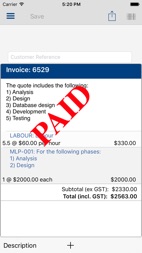
An invoice can be marked as Paid - by cash, cheque, credit card or EFT. This fact is then shown on the invoice, both printed and on the device.
Printing or emailing or SMSing (iOS7+) a quote or invoice involves selecting the customer from the list of customers or entering a customer name, specifying or modifying the default discount, if any, and then tapping the print or email or SMS button to generate and preview the invoice. The discount and GST are applied and the total shown on the invoice. The quote or invoice can then be emailed or printed on a wireless printer or via your Mac or PC using inexpensive software on the Mac or PC that enables wireless printing to a wired printer. The invoice can also be sent to/stored in iBooks (free from Apple iTunes) or similar software from where it can be emailed.
If the product data (item code, description, bar code, price) already exists in digital form then that can be loaded into Invoice; please email. Prices can be adjusted at any time.
This app runs on iPhone, iPod Touch and iPad, including iPhone5, 6 and 6 Plus. Successful scanning of some barcodes is dependent on the resolution of the camera on the device (older iPods and iPads).
Invoice is can be customised with a company logo, ABN, Order Number, two footer lines for general company information such as phone number, hours of business, web site address etc.
Installation of the company’s header/logo as the invoice header is achieved by selecting a photo from the Photo Library or by using iTunes File Sharing - http://support.apple.com/kb/HT4094 : connect your iPhone, iPad or iPod Touch to iTunes, click on your device on the left, click Apps along the top and scroll down until you see the File Sharing section. Scroll through the apps and click once on Invoice. In the right-hand pane you should see Documents. Click the Add button and add a file called CompanyLogo.png that contains your header/logo. Ensure the name of the file is exactly this. The dimensions of the PNG should be approximately 595 x 100 pixels.
Invoices are stored on the device and can be recalled at any time.
If there are two devices awake and running Invoice on the same wireless subnet then any changes to invoices, customers, prices or the company details made on one device are (optionally) immediately sent to the other device. This allows, for example, an iPhone to be used to scan and enter the items for the invoice, and then an iPad used to finalise and check the invoice before printing/emailing it. Of course the iPhone can do all these steps as well.
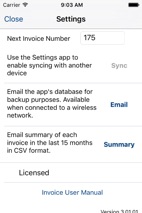
The database in the device can be sent at the tap of a button from one device to the other to ensure the two devices have the same data. This synchronisation can include or exclude the invoices in the source device. Invoice can also email a copy of its database: this can be used for backup purposes. There is a preference in the Settings app to cause Invoice to alert the user if the database has not been emailed in the previous 7 days.
Monthly statements and invoices can also be generated and printed.
The GST rate can be modified in the Settings app..
License
Invoice has a number of (non-functional) limitations prior to an in-app purchase which enables unlimited Invoices, Customers, parts etc.
Questions: please send me an email
Invoice
Copyright 2012-2021 Venthoop Pty Limited