My Lap Timer


MyLapTimer is primarily a native Watch app for runners doing laps. It is easy to start and stop a lap with a single tap: no countdown timer to start, no swiping or double-taps to finish.
This app works even when the paired iPhone is not present.
Elapsed time, distance (as reported by the Watch) and pace are displayed while running. These 3 values are reset when the Start button is tapped.
Lap distance, time and pace are saved on the Watch and these can be viewed by swiping right to left. This action also transfers the lap data to the companion iPhone app if the iPhone is within range and this app is running.
At the bottom of the list is a Clear button to delete all the laps on the Watch; this could be used at the start a session.
Lap distance, duration and calories are also optionally stored in HealthKit and contribute to the Activity rings (Fitness app). The number of laps is also shown in the Fitness app.
A Settings screen in the Watch app enables the choice of metric or imperial units. This screen is reached by swiping right to left from the screen displaying the completed lap times. Activity type can also be selected here.
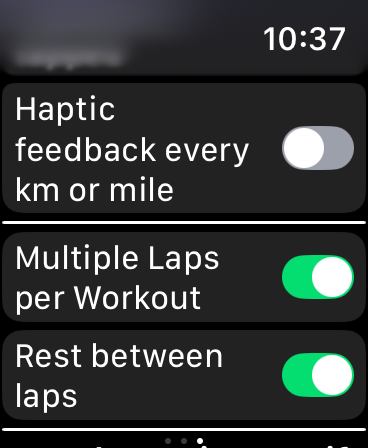
Multiple sequential laps can be timed - the Multiple Laps switch is on the watch app's settings screen (3rd section below the Haptic Feedback switch). The Stop button then becomes ‘End Lap’. Double-tap to end the last lap. Interval trainign can include rest periods as well.
Haptic feedback after every mile or 1000 meters can be selected.
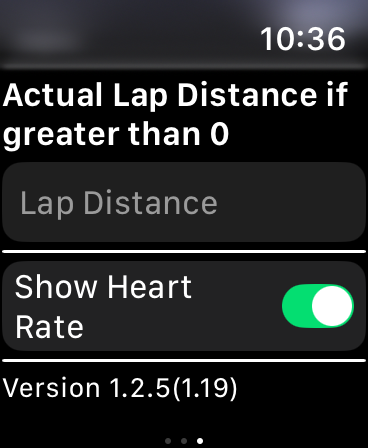
Heart rate can be shown.
Lap distance can be specified. This is useful if running indoors or when the exact lap distance is known when performing interval training. This distance is then used stored rather than the GPS distance reported by the watch,
The companion iPhone app can be used to view, modify and delete laps, as well as share any day's laps as a CSV file via email.
Data is transferred from the Watch to the paired iPhone whenever the completed lap times screen in the Watch app is viewed by swiping right to left on the main screen and the iPhone is in range.
My Lap Timer
Copyright 2017-2026 Godfrey Raftesath
Questions: please send me an email